
arg
Supreme User
-
Joined
-
Last visited
Everything posted by arg
-
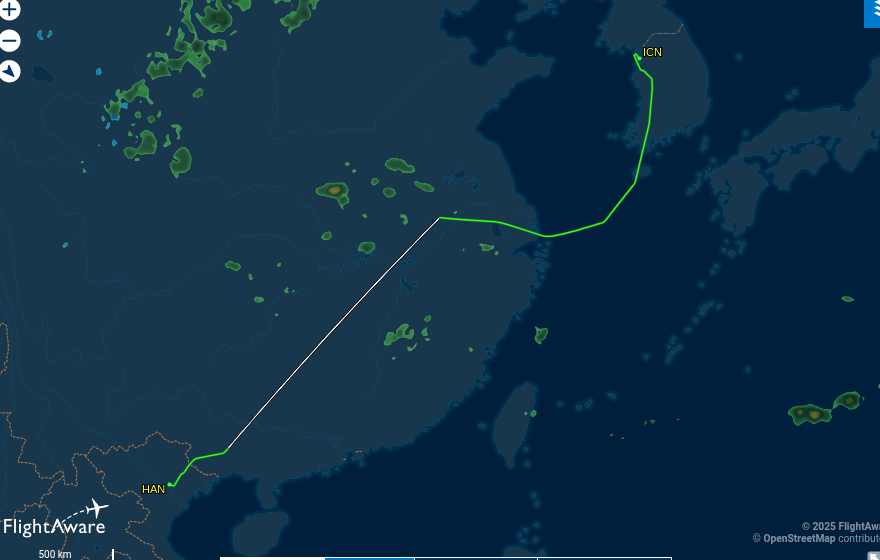
These were fun. Is 30 years long enough to be history Better video of how it workedThis guy has some interesting videos. What got my attention was the 30mm pointer"his buddy Putin?" 2016 called.....Now we have to define "due process of law".When I was tracking the flight it looked like they were direct ICN, then they made that big course change. I thought maybe weather but it didn't show any right where they were. I looked at past flights and one did fly a similar flight path. Who knows. Funny thing, her itinerary shows KA all the way to LIT. Must be some sub. By the way, she had a great time there.Daughter's on the way home from the Viet Nams. Korean Air all the way. Was curious about the heading change to the east over China.
 Looks like a hell of a rackNot holding my breath but a $400million fine seems about right.GTF outta the left lane Granpa WTF are you driving that you let a Ford and a Dodge pass you? Used to see a few Harleys in Japan. And classic US autos.The big question is, will leadership know how to use it?Interesting interaction
Account
Navigation
Search
Configure browser push notifications
Chrome (Android)
- Tap the lock icon next to the address bar.
- Tap Permissions → Notifications.
- Adjust your preference.
Chrome (Desktop)
- Click the padlock icon in the address bar.
- Select Site settings.
- Find Notifications and adjust your preference.
Safari (iOS 16.4+)
- Ensure the site is installed via Add to Home Screen.
- Open Settings App → Notifications.
- Find your app name and adjust your preference.
Safari (macOS)
- Go to Safari → Preferences.
- Click the Websites tab.
- Select Notifications in the sidebar.
- Find this website and adjust your preference.
Edge (Android)
- Tap the lock icon next to the address bar.
- Tap Permissions.
- Find Notifications and adjust your preference.
Edge (Desktop)
- Click the padlock icon in the address bar.
- Click Permissions for this site.
- Find Notifications and adjust your preference.
Firefox (Android)
- Go to Settings → Site permissions.
- Tap Notifications.
- Find this site in the list and adjust your preference.
Firefox (Desktop)
- Open Firefox Settings.
- Search for Notifications.
- Find this site in the list and adjust your preference.