Leaderboard
-
Beaver
Supreme User3Points674Posts -
bagasticks
Registered User1Points96Posts -
herkbum
Supreme User1Points1,210Posts -
Ram
Supreme User1Points1,158Posts


Popular Content
Showing content with the highest reputation on 06/02/2012 in all areas
-
3 points
-
1 pointApparently their professional development advice does not include the 3 exclamation point limit per OPR comment block.1 point
-
that -8 is marked with the "crusaders" logo, the candystripers was a werewolf riding a whiskey bottle.. here's the original candystripers logo..1 point
-
Both quickly rendered unnecessary with a few beverages1 point
-
1 point
-
1 point
-
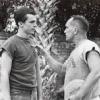
1 pointWW II P-47 Pilot 404th FG / Trumpet Player Col. (Ret) Jack Tueller. Article: https://www.deseretne...notes.html?pg=1 *Thx Rainman1 point