

Jump to content
View in the app

A better way to browse. Learn more.

Baseops Forums

A full-screen app on your home screen with push notifications, badges and more.

To install this app on iOS and iPadOS
  1. Tap the Share icon in Safari
  2. Scroll the menu and tap Add to Home Screen.
  3. Tap Add in the top-right corner.
To install this app on Android
  1. Tap the 3-dot menu (⋮) in the top-right corner of the browser.
  2. Tap Add to Home screen or Install app.
  3. Confirm by tapping Install.

Flaps_n_Slats

Registered User
  • Joined

  • Last visited

Everything posted by Flaps_n_Slats

  1. SAF/PC denied my request unfortunately. Best needs of the Air Force
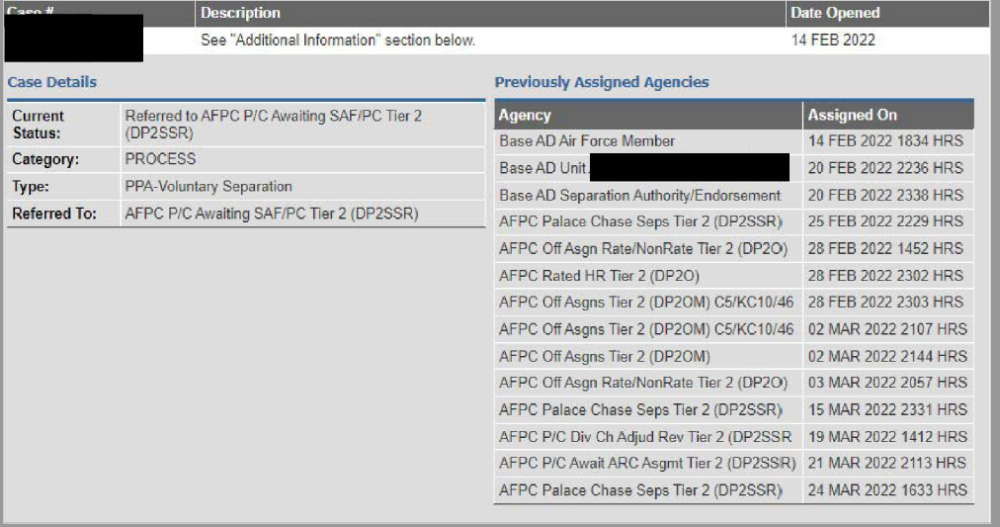
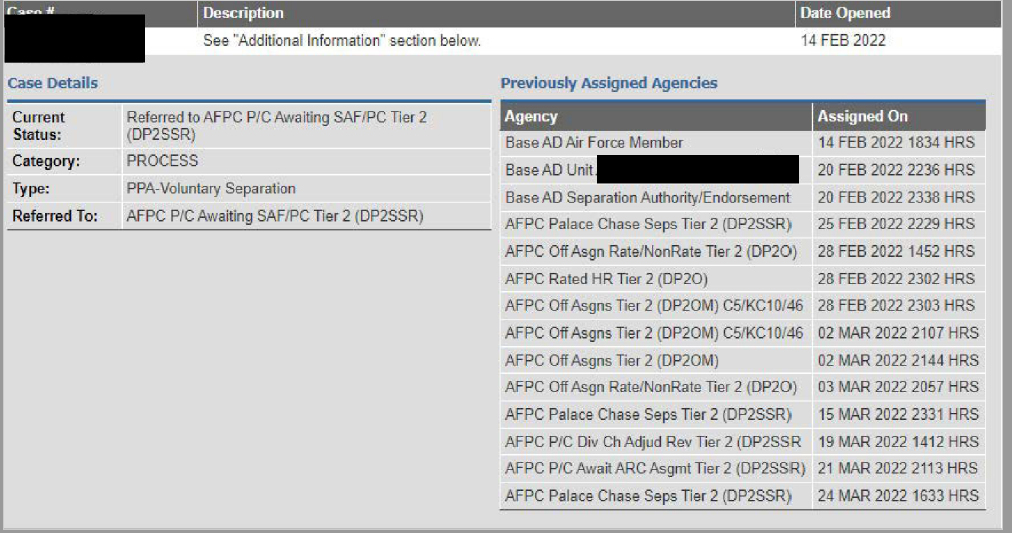
  2. I wish I find this forums a couple of months ago when I was starting the application process. I had no idea one could see the Palace Chase flow through vMPF in the CMS case section....so thanks for all the info you guys have all shared. I'm currently going through the Palace Chase process and am awaiting SAF/PC to make a decision. I know the SAF/PC process can take up to 45 days so I'm hoping for maybe at the end of April to have final word. I wish I woulda started this process earlier since I have 120 days of leave to use as terminal. If approved, does anyone know how easy to push back the DOS?
Configure browser push notifications

Chrome (Android)
  1. Tap the lock icon next to the address bar.
  2. Tap Permissions → Notifications.
  3. Adjust your preference.
Chrome (Desktop)
  1. Click the padlock icon in the address bar.
  2. Select Site settings.
  3. Find Notifications and adjust your preference.