


Jump to content
View in the app

A better way to browse. Learn more.

Baseops Forums

A full-screen app on your home screen with push notifications, badges and more.

To install this app on iOS and iPadOS
  1. Tap the Share icon in Safari
  2. Scroll the menu and tap Add to Home Screen.
  3. Tap Add in the top-right corner.
To install this app on Android
  1. Tap the 3-dot menu (⋮) in the top-right corner of the browser.
  2. Tap Add to Home screen or Install app.
  3. Confirm by tapping Install.

Gnarles

Registered User
  • Joined

  • Last visited

Everything posted by Gnarles

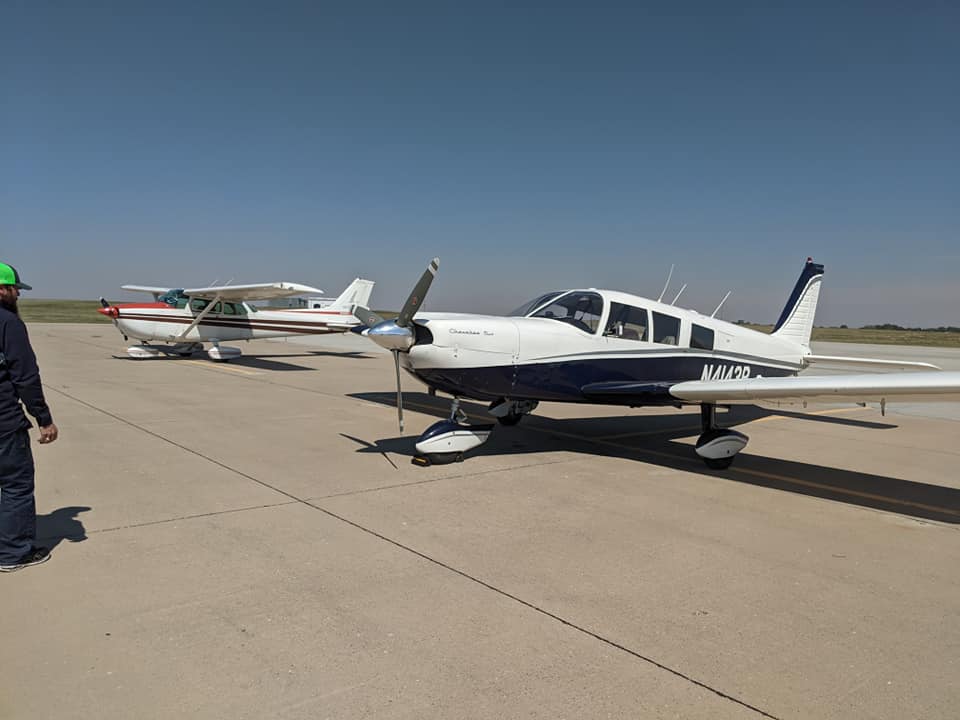
  1. New member here. Started in a PA-28 for PPL, switched schools and finished in a C-172N. Currently own a PA-32-300 with my brother and dad. We're looking to upgrade to a twin eventually but just dropped some coin on autopilot, Garmin glass panel, and some other upgrades so it might be a while. She's not as fast as a Mooney or high-profile as a Cirrus but she can definitely haul some weight.

Configure browser push notifications

Chrome (Android)
  1. Tap the lock icon next to the address bar.
  2. Tap Permissions → Notifications.
  3. Adjust your preference.
Chrome (Desktop)
  1. Click the padlock icon in the address bar.
  2. Select Site settings.
  3. Find Notifications and adjust your preference.
