Lobster
Registered User
-
Joined
-
Last visited
-
"Sputnik" Thank you. Please let me know if you find anything - Thanks again.
-
"rancormac" You're awesome! Thanks for the link, however, they sold the last one back in May. Still searching. Thanks again sir.
-
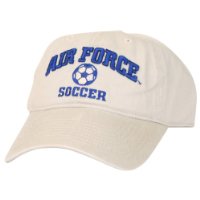
Just this past weekend my daughter lost her khaki "Air Force Soccer" cap while boating. The hat was a gift, and until you have kids, you'll never appreciate the look of dissapointment on my poor kids face when I couldn't recover the cap before it slipped deeper under the boat and to the bottom of the lake. Up to that point, I didn't realize how fond of the cap she really was. I've searched everywhere, to include google, the USAFA gift shop, ebay etc and only found a photo of the cap. As a plea for help, if any of you have a spare or know of one please let me know - I'll pay top dollar for a duplicate. Please PM me if you have a lead. Thanks in advance.